

The Lenovo Legion Go emerged as a new and more powerful alternative to the Steam Deck, providing users with yet another handheld gaming PC to play their favorite games on the go. Among its selling points is the 8.8-inch 144Hz screen with 500 nits of brightness, a stellar feature that guarantees vibrant images each time you play.


Although the Legion Go is an impressive device, there are a handful of accessories that you can get to spice up your ownership experience. These accessories range from chargers and gaming power banks to gaming headsets and memory cards. No matter your preferences, these items are intended to make your time with the Legion Go unforgettable. If you're unsure of which ones to get, this guide to the best accessories for the Legion Go should provide enough insight to achieve a wholesome handheld experience.
The Best War Games's Picks for the Best Lenovo Legion Go Accessories
-
Best OverallImage
 Display card main info widget
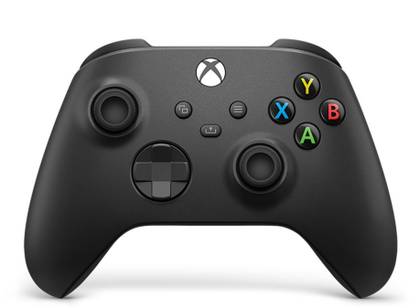
Xbox Core Wireless Controller
$50 $60 Save $10Display card main info widget end- Brand
- Microsoft
- Platform
- Xbox One, Xbox Series X|S, PC
- Battery
- Up to 30 Hours
- Connectivity
- USB, Bluetooth
- Headset Support
- Yes
The Xbox Core Controller has a modernized design that enhances one's gaming experience. With sculpted surfaces and refined geometry, it offers effortless control and enhanced comfort during gameplay. Play for up to 30 hours without needing to recharge thanks to its long battery life. The hybrid D-pad and textured grip on the triggers, bumpers, and back-case help gamers stay on target. The controller includes a 3.5 mm audio headset jack for any compatible headset, and gamers can connect it to their console or PC using the USB-C port.
Checkbox: control the expandable behavior of the extra info -
Image
 Display card main info widget
Ugreen 145W 25000mAh for Laptop
$82 $100 Save $18Display card main info widget endThe Ugreen 145W 25,000mAh Power Bank is specifically designed to be compatible with MacBooks, offering efficient charging with its high 145W output. Its 25,000mAh capacity ensures multiple charges for MacBooks and other high-power laptops. The Ugreen power bank also boasts a compact and lightweight design, making it easy to carry around in a backpack or laptop bag. Additionally, there’s an integrated LED display on the side which shows the remaining battery level, keeping the user informed.
Checkbox: control the expandable behavior of the extra info -
Checkbox: control the expandable behavior of the extra infoImage
 Display card main info widget
iVANKY 8-in-1 Docking Station
$30 $40 Save $10Display card main info widget end -
Image
 Display card main info widget
Tomtoc Carrying Case for ROG Ally and Steam Deck
Display card main info widget endThe ROG Ally comes with a carrying case, but it's big enough for exactly the Ally and nothing else. If you are looking for something a bit roomier, Ally owners love this shoulder bag from Tomtoc (also compatible with the Steam Deck). It features a protective, strap-enclosed pocket to keep the console from brushing up against other items, with plenty of space in the other compartment for a small collection of accessories.
Checkbox: control the expandable behavior of the extra info -
Image
 Display card main info widget
Corsair HS65 Surround
Display card main info widget end- Microphone
- Omni-directional
- Compatibility
- PC, PS5/PS4, Xbox Series X | S, Nintendo Switch, and mobile devices
- Brand
- Corsair
- Surround Sound
- Dolby Audio 7.1
- Weight
- 282 g
- Frequency Response
- 20Hz - 20 kHz
The Corsair HS65 Surround is a gaming headset with high-quality, custom-tuned 50 mm drivers, which deliver clear sound with support for Sony Tempest 3D audio on the PS5. The headset has comfortable leatherette-covered memory foam ear cups and a durable, adjustable aluminum headband. This makes the Corsair HS65 Surround also light at 282 grams, which makes it easier to game for hours. As the name suggests, there's also support for Dolby Audio 7.1 Surround Sound by using the USB adapter provided with the headset.
Checkbox: control the expandable behavior of the extra info -
Image
 Display card main info widget
amFilm 2 Pack Upgrade Version Screen Protector for Lenovo Legion Go
$10 $13 Save $3Display card main info widget end
Checkbox: control the expandable behavior of the extra info
Looking for extra screen protection for your Legion Go? Look no further. Specifically designed for the Legion Go, the amFilm 2 Pack screen protector offers an ultra-thin 0.3mm thickness which ensures that the screen stays safe without compromising on touch sensitivity. It's also durable and scratch resistant, thereby assuring you a pristine screen. To reduce fingerprint smudges, it has oleophobic coating.
-
Image
 Display card main info widget
Lexar 1TB PLAY microSDXC UHS-I Card
Display card main info widget end
Checkbox: control the expandable behavior of the extra info
The Lexar 1TB PLAY microSDXC UHS-I Card is specifically designed for gamers, featuring A2 and U3 ratings for faster loading times and enhanced gaming performance. It has transfer speeds similar to the Samsung 1TB Evo Select, making it a great alternative if you want something cheaper. It's ideal for gamers with a large library of games, as its 1 TB space can upgrade the Legion Go's storage by far.
-
Image
 Display card main info widget
JSAUX 10FT Cable 65 Watt Laptop Wall Fast Charger
Display card main info widget end
Checkbox: control the expandable behavior of the extra info
The JSAUX wall charger boasts an output of 65W which is what the Legion Go demands, thereby making it a perfect match. It also comes with different protection features such as over-current protection, over-voltage protection, and overheating protection.


What to Consider When Choosing the Best Lenovo Legion Go Accessories
Selecting the right accessories for your Legion Go is no easy task, seeing as the market has diverse options. To help you make an informed decision, below are some factors worth considering.
- Price: Like every product, the cost of a Legion Go accessory matters, especially if you're working on a tight budget. Some items are pretty affordable, making them a no-brainer purchase, while more expensive items need some consideration. Unless you have a generous budget, ensure that you keep the cost of these items at the back of your mind.

The Best Steam Deck Accessories in 2024
These are the Steam Deck accessories you need to maximize your system!
- Functionality: Another factor worth considering is functionality. How well is an accessory suited to your needs? Will you be using a controller solely for playing games? Some controllers come with an audio jack, allowing you to listen to music with headphones while exploring the connected open world of Watchdogs. When shopping for a dock, do you prefer the types that come with extra ports for hooking up multiple devices?
- Brand: It's important to patronize well-known brands as they are known to have stellar customer support, which can come in handy if you need to initiate a return. Admittedly, some generic brands tend to sell their items at a significantly lower price, but how well do they attend to customer complaints? Do they offer a decent warranty period? To avoid regrettable purchases, it's best to play it safe by ordering from a known brand.
Best Overall Accessory for the Legion Go
Xbox Core Wireless Gaming Controller
Although the Xbox Core Wireless controller has been overshadowed by the customizable Elite Wireless Controller Series 2, the former remains an excellent choice to pair with the Legion Go. Aside from the handheld PC, the controller also offers support for a plethora of devices, including the current-gen Series X|S, Windows, Android, and iOS. Xbox controllers are well-known in terms of ergonomics, and this one doesn't disappoint. Holding this controller for hours shouldn't cause you any discomfort at all.
The Core Wireless gaming controller has low latency, a feature that's hard to come by for many wireless gamepads. It also comes with a USB-C cable that allows you to play in wired mode. Depending on your preferences, feel free to play wirelessly or tethered to the Legion Go. You can also use the Xbox Accessories app to reprogram buttons and personalize controller profiles for specific games. This means you can have a special set of controls for Forza Horizon 5 and another one for The Witcher 3: Wild Hunt. If you're looking to block out any outside noise, the controller allows you to do so thanks to its 3.5mm head jack. Its affordability should not be ignored too, as it's currently available for under $50, making it an even more reasonable purchase for the Legion Go.
Best Value Accessory for Legion Go
UGREEN Power Bank 25,000mAh 145W Laptop Portable Charger
Like other handheld gaming PCs such as the Steam Deck and Asus Rog Ally, the Legion Go is plagued by terrible battery life. Unless you're plugged into a wall and gaming simultaneously, getting up to 5 hours out of the Legion Go seems impossible, especially when you're playing a demanding game. To help users experience true handheld gaming, the UGREEN 145W 25,000 mAh power bank is a competent portable charger that can keep you gaming for long. Interestingly, it supports both Windows PCs and Macbooks, making it a worthy purchase for your laptop. As advertised, it offers a 25,000 mAh battery and an output of 145W that should recharge laptops more than once and mobile devices up to five times.
To help users know the exact percentage at a time, it has an LED digital display that does this. It also supports bidirectional charging, an incredible feature whereby you can charge the power bank while it's fast charging your devices. It's also pretty lightweight, so it can easily accompany you to the coffee shop, office, and woods for a camping trip. It also has a small current mode that supplies the recommended voltage to smaller gadgets, such as Airpods and smartwatches.
Best Dock for the Legion Go
iVANKY 6-in-1 Docking Station
One of the Legion Go's best features is the fact that you can choose to game on its 144Hz 2560 x 1600 IPS screen or on your gaming TV. This is possible thanks to a dock to which you connect the handheld PC. Although there are several options, none come close to the iVANKY 6-in-1 docking station. Aside from supporting Lenovo’s handheld PC, it's also compatible with the Steam Deck, ROG Ally, and even the MSI Claw. As mentioned, it comes with 6 different ports (one 4K@60Hz HDMI port, 1Gbps Ethernet port, three 5Gbps USB-A 3.0 ports, and a rapid-charging USB port) that can service your multiple devices simultaneously.
Using the 4K@60Hz port, the Legion Go will render content at the standard of most gaming consoles, allowing you to experience stunning in-game environments with minimal stutters. Ensure you pair it with a 4K TV or monitor for optimal performance. While your Legion Go is busy projecting a game on the big screen, the dock charges it at maximum speed (65W), leaving you with enough battery to game for a few hours should you return to handheld mode.

These Accessories Will Keep Your Rog Ally X in Pristine Condition for Longer
Don't let scratches and dents ruin your ROG Ally X experience. Keep your handheld safe and clean with the best cases, screen protectors, and more.
FAQ
Q: Does the Lenovo Legion Go need a dock?
If you intend to play games on a larger screen sometimes, then a dock is your best bet for making that happen. Aside from rendering your games on a TV screen, docks come with multiple connectivity ports which are great for users with many devices.
Q: What does the Lenovo Legion Go come with?
The Legion Go comes with a 65W charging adapter, a USB-C cable that can't be detached, and a carrying case.
Q: Is it worth getting a Legion Go?
If you want to run the latest games without having to tweak the settings to make it playable, then yes, the Legion Go is a worthy investment. It also has a vibrant screen, which makes in-game scenes look better than on alternatives like the Steam Deck.