


Call of Duty: Warzone’s highly anticipated integration with Black Ops 6 has completely overhauled the content and gameplay, offering players a fresh experience. To maximize your performance in the popular battle royale game, optimizing your controller settings is essential.
With the introduction of Omnimovement from BO6, which brings significant changes to movement mechanics, it’s important to adjust your settings to match your playstyle. Below are the best controller settings for CoD Warzone on PlayStation, Xbox, and PC.
Best Controller Settings for Call of Duty: Warzone

These Warzone controller settings are optimized to improve accuracy when shooting enemies from different distances and provide smoother movement overall. Yet, the settings outlined below might need to be tailored to suit each player’s personal playstyle, so be sure to make adjustments of your own to find what suits you best.
Inputs Settings
- Button Layout – Tactical Flipped
- Stick Layout – Default
- Horizontal Stick Sensitivity – 7
- Vertical Stick Sensitivity – 7
- Simplified Controls – Off
- Low Motor Strain – Off
- L1 Button Ping – Off
- Swap L1/R1 with L2/R2 – On
Sensitivity settings are ultimately a matter of personal preference, but setting them to seven is recommended, especially with the introduction of Omnimovement in Warzone. This new mechanic grants you more movement options, and a lower sensitivity could considerably affect gameplay flow.
That said, it’s perfectly fine to start with a lower sensitivity to adjust to the new mechanics, and then gradually increase it until you find the sweet spot that works best for you.
Controller Settings
- Controller Vibration – Off
- Trigger Effect – Off
-
Deadzone Inputs
- Left Stick Min – 5 (manually adjust to reach zero when using the Test Stick Deadzone option without getting Stick Drift)
- Left Stick Max – 98
- Right Stick Min – 3 (manually adjust to reach zero when using the Test Stick Deadzone option without getting Stick Drift)
- Right Stick Max – 99
- L2 Button Deadzone – 0
- R2 Button Deadzone – 0
Best Aiming Settings for Call of Duty: Warzone

Aiming Settings
- Sensitivity Multiplier – Default
- Look Inversion (On Foot) – Standard
-
Aiming Advanced Settings
- Look Inversion – Default
- ADS Sensitivity Transition Timing – Instant
- 3rd Person ADS Correction Type – Assist
-
Aim Response Curve Type – Dynamic
- Aim Response Curve Slope Curve – 1.00
-
Custom Sensitivity For Zoom – On
- ADS Sens. Multiplier (Low Zoom) – 0.80
- ADS Sens. Multiplier (2x-3x Zoom) – 0.85
- ADS Sens. Multiplier (4x-5x Zoom) – 0.85
- ADS Sens. Multiplier (6x-7x Zoom) – 0.95
- ADS Sens. Multiplier (8x-9x Zoom) – 1.00
- ADS Sens. Multiplier (High Zoom) – 1.00
Aim Assist Settings
- Target Aim Assist – On
- ADS Aim Assist – On
Motion Sensor Settings
- Motion Sensor Behavior – Off
- Motion Sensor Advanced Settings – Default
Best Movement Settings for Call of Duty: Warzone
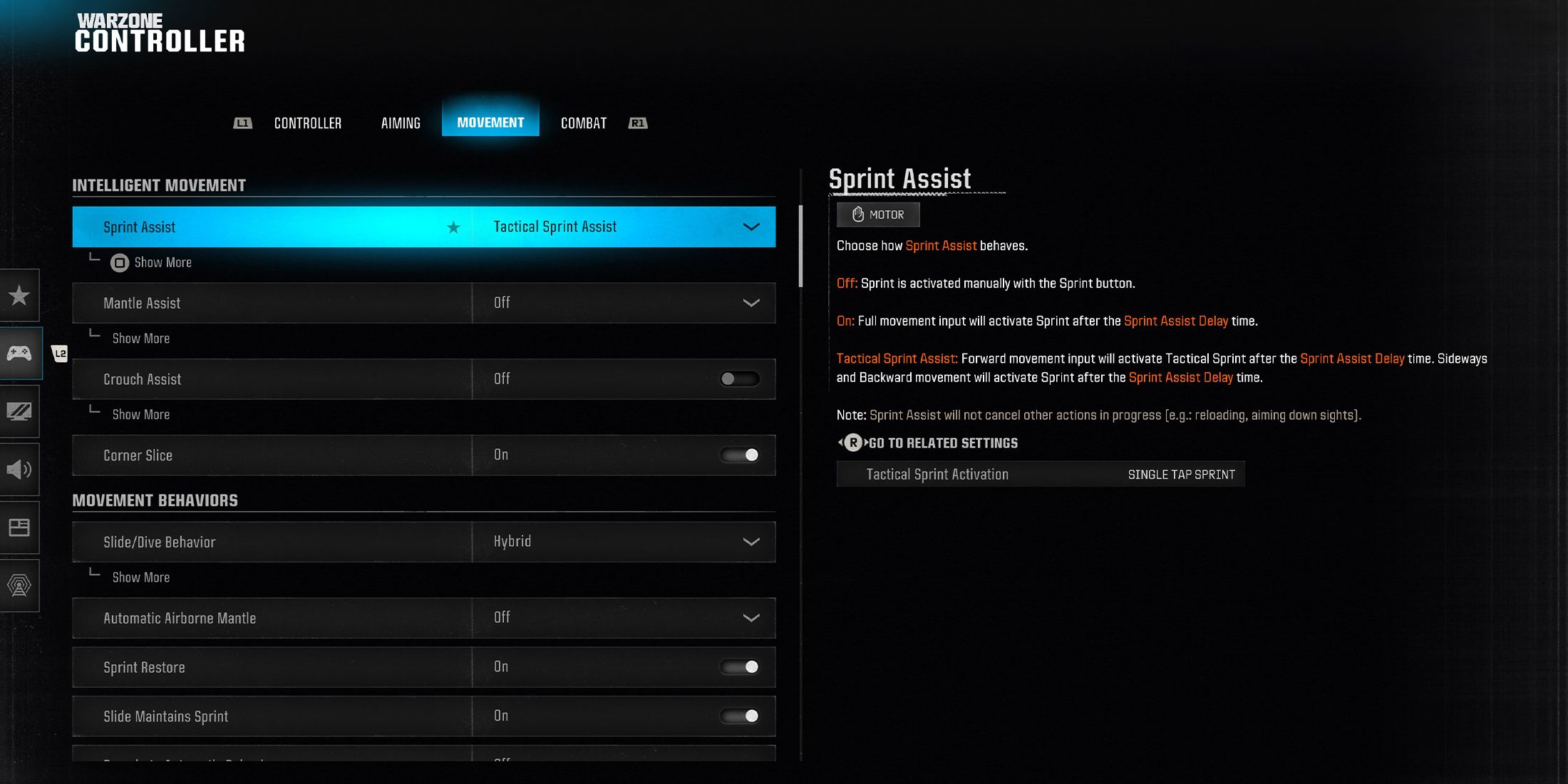 Intelligent Movement Settings
-
Sprint Assist – Tactical Sprint Assist
- Sprint Assist Delay – 0
- Sprint Assist Sideways – On
- Sprint Assist Backwards – On
- Mantle Assist – Off
- Crouch Assist – Off
- Corner Slice – On
Movement Behavior Settings
- Slide/Dive Behavior – Hybrid
- Automatic Airborne Mantle – Off
- Sprint Restore – On
- Slide Maintains Sprint – On
- Parachute Automatic Behavior – Off
- Mantle Cancel Reload – Off
-
Movement Advanced Settings
- Sprint/Tactical Sprint Behavior – Toggle
- Auto Move Forward – Off
- Auto Door Peek – Off
- Grounded Mantle – Off
- Tactical Sprint Behavior – Single Tap Sprint
- Plunging Underwater – Trigger
- Sprinting Door Bash – On
Vehicle Behavior Settings
-
Vehicle Advanced Settings
- Vehicle Control Mode – Driver Control
- Scorestreak Vehicle Control Mode – Aim-Based Control
- Vehicle Camera Recenter – Short Delay
- Camera Initial Position – Free Look
- Lean-Out Activation – Melee / Finishing Move / Body Shield
Mastering the Omnimovement system in Warzone requires simplifying controller inputs to avoid overwhelming commands. Enabling Tactical Sprint Assist, Hybrid Slide/Dive Behavior, and Single Tactical Sprint Behavior ensures smoother gameplay by enhancing movement without sacrificing control.
One crucial setting to disable in Warzone is Mantle Cancel Reload, which is enabled by default. Leaving this on can make gameplay feel clunky, as it prevents you from reloading while mantling, potentially leaving you vulnerable during critical engagements.
Best Combat Settings for Call of Duty: Warzone

Combat Settings
- Aim Down Sight Behavior – Hold
- Tactical Stance Behavior – On Toggle
- Tactical Stance Activation – ADS + Down Button
- Weapon Mount Activation – ADS - Melee
- Dedicated Melee Weapon Activation – Hold Melee
- Body Shield / Finishing Move Behavior – Prioritize Finishing Move
- Armor Plate Behavior – Apply All
- C4 Detonation Activation – All at Once
- Equipment Behavior – Hold
- Manual Fire Behavior – Press
-
Combat Advanced Settings
- Change Zoom Activation – Sprint / Tactical Sprint / Focus
- Weapon Mount Exit – Instant
- Interact Reload Behavior – Prioritize Interact
- Sprint Cancels Reload – Off
- Akimbo Behavior – Independent
- ADS Stick Swap – Off
- Depleted Ammo Weapon Switch – Off
Overlay Behavior Settings
- Overlay Advanced Settings – Default
These controller settings offer a strong footing, but to personalize them further, the ideal approach is to dive into Plunder mode. This mode allows you to explore Warzone’s new mechanics and fine-tune each setting to align with your playstyle while testing them in a realistic environment.
-
Checkbox: control the expandable behavior of the extra infoRating block community and brand ratings Image
 9 /10
9 /10Call of Duty: Warzone
Display card tags widget Display card system widgetDisplay card community and brand rating widget Display card open critics widgetSystems

 Display card main info widget
-
 OpenCritic Reviews
- Top Critic Avg: 80 /100 Critics Rec: 78%
Display card main info widget end Display card media widget start Display card media widget end- Released
- March 10, 2020
- ESRB
- M for Mature: Blood and Gore, Strong Language, Suggestive Themes, Use of Drugs, Violence
- Developer(s)
- Infinity Ward, Raven Software
- Publisher(s)
- Activision
- Engine
- IW 8.0 & IW 9.0 (Warzone 2.0)
- Multiplayer
- Online Multiplayer
- Cross-Platform Play
- PC, PS4, PS5, Xbox One & Xbox Series X|S
WHERE TO PLAY
SUBSCRIPTIONDIGITAL- Platform(s)
- Xbox One, PC, PS4, PS5, Xbox Series X, Xbox Series S
- Genre(s)
- First-Person Shooter, Battle Royale
- OpenCritic Rating
- Strong
-
-
Checkbox: control the expandable behavior of the extra infoRating block community and brand ratings Image
 Display card tags widget Display card system widgetDisplay card community and brand rating widget Display card open critics widgetSystems
Display card main info widget
Display card tags widget Display card system widgetDisplay card community and brand rating widget Display card open critics widgetSystems
Display card main info widget-
OpenCritic Reviews
- Top Critic Avg: 83 /100 Critics Rec: 91%
Display card main info widget end Display card media widget start Display card media widget end- Released
- October 25, 2024
- ESRB
- Mature 17+ // Blood and Gore, Intense Violence, Suggestive Themes, Strong Language, Use of Drugs
- Developer(s)
- Treyarch, Raven Software
- Publisher(s)
- Activision
- Engine
- IW 9.0
- Multiplayer
- Online Multiplayer, Online Co-Op
- Cross-Platform Play
- Yes - PlayStation, Xbox, PC
WHERE TO PLAY
SUBSCRIPTIONDIGITALPHYSICAL- Platform(s)
- PlayStation 5, PlayStation 4, Xbox Series X, Xbox Series S, Xbox One, PC
- Genre(s)
- FPS
- OpenCritic Rating
- Strong
-












