


I grew up playing the original Sims and The Sims 2, and have many fond memories of maxing out my Sims' skills, building relationships between them, starting families, and constructing giant houses. My nostalgia for The Sims put InZOI on my radar as soon as it was announced, but I've always been skeptical of the game. To me, it's always seemed like one of those games that promises too much. But InZOI has taken me completely by surprise. Even in its early access state, the life simulation game is a blast and genuinely gives The Sims a run for its money.
Like The Sims, the first step in InZOI is creating a family. The character creation process for the "Zois" is nothing short of incredible. There are plenty of presets available and sliders to tweak, but players also have the option to simply grab whatever part of their Zoi they want to adjust and drag the mouse to do so. There is a great deal of freedom and extensive options when it comes to creating a Zoi, with the only restriction being the inability to adjust where a scar was placed on a Zoi's face. Still, even in early access, InZOI's character creation tools are impressive.
Once players are satisfied with their Zois, the next step is to choose which of the three available open world cities to settle down in. The options are Dowon, Kucingku, and Bliss Bay, which are inspired by South Korea, Indonesia, and Los Angeles, respectively. For my first pair of Zois, I chose Dowon, and moved them into an apartment.
InZOI Constantly Impresses
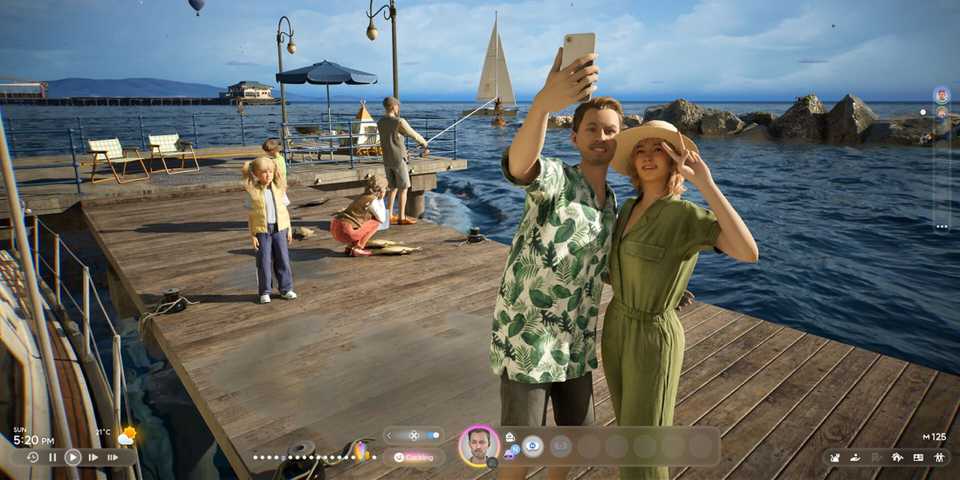
InZOI's core gameplay is near-identical to The Sims, but with more realistic graphics and far more options when it comes to interacting with any given object or Zoi. Like Sims, Zois have needs that must be met if they are to live happy and healthy lives, with players needing to make sure their Zois shower, eat, sleep, etc. The Zois can be given autonomy and left to their own devices, or players can micromanage every aspect of their lives. This can all be handled with the typical bird's eye view like The Sims, or players can zoom in for an immersive over-the-shoulder look. Players also have the option to explore with a free camera or even take direct control of their Zoi, which makes the game that much more immersive.
I wanted to see what limitations there were on my Zoi, and quickly found out that there weren't really any. I left the apartment building and started walking around the city, bumping into a couple of other Zois that live there (and can also be controlled by the player). I spotted a public basketball court and figured that it was nothing more than decoration for the city. I was delighted when I found out that I could actually have my Zoi play basketball, though the public display did seem to make him embarrassed.
While I was directly controlling that Zoi, the other one had their autonomy left on and was, for some bizarre reason, constantly choosing the "Overspend" option on their computer, which kept costing me $5,000 a pop. Needing to replenish my funds, I used the handy smartphone each Zoi has to secure both of them jobs that started the next day. Zois disappear when they leave for their jobs, but prompts pop up throughout the day that have players make choices about what exactly their Zois are doing at work.
Players can improve their Zoi's work performance, ambitions, and stats in general by engaging with various objects and completing tasks, though the latter feature didn't seem to work properly in my experience and across multiple Zoi families. The objectives weren't track and wouldn't complete, but hopefully that's something that can be ironed out quickly.
I experienced a few other oddities in InZOI, which is honestly expected from the genre, especially in early access. In one instance, two Zois were dancing together, but one of the Zois couldn't stop dancing. They were trapped dancing forever, with the only way to save them being to exit and reload the game. In another instance, if there was a chair in a room, the Zois would only talk to each other if one of them was sitting down.
Despite the occasional glitch, InZOI is surprisingly polished and runs well for an early access game. A random loading screen will interrupt the game every once in a while, but I experienced no crashes or freezes and any technical issues were relatively minor. I've certainly experienced more catastrophic problems in The Sims. That being said, my time with InZOI was limited compared to how much time I've spent playing The Sims games, so it's always possible that there are more serious issues that will be discovered when everyone else gets their hands on the early access version of the game.
InZOI Lets You Play How You Want
After spending a while with my Zoi couple, I created a new Zoi and moved them into an empty lot in Bliss Bay to test the game's building tools. Anyone familiar with building houses in The Sims should be able to figure out how InZOI's building works right away, with players able to construct walls, roofs, doors, and essentially build their house however they'd like. There are also pre-built houses that players can plop on empty lots if they so choose, and, as a bonus, they even come fully-furnished, so players can start focusing on their Zoi right away.
Building in InZOI works like it should, and those who like building things in life simulation games should have a lot of fun with the tools available. But InZOI's building tools go beyond the home. Players are also able to directly customize the city that their Zois live in, removing existing objects, filling the streets with specific decorations, populating the game world with animals, editing the billboards, and even changing the weather on a whim. Giving players this much control threatens to make the game over-complicated, but InZOI is easy to play and understand, and if players are ever confused, there are built-in tips, complete with videos, that go over everything in detail.
I tested the Early Access version of InZOI on a Windows PC using an Nvidia GeForce RTX 3080, 3.70 GHz AMD Ryzen 9 5900X 12-Core Processor, and 32 GB RAM.
InZOI gives players near-endless options when it comes to creating and customizing their game world. Players are even free to create their own objects with the furniture customization tool and the 3D Printer, which lets players upload an image file that AI then turns into a 3D object for use in the game. This feature may be controversial, but it's still impressive tech. Those willing to connect their iPhone to InZOI can enjoy other interesting bonus features like face scan tech that makes it so Zois mimic your real-world facial movements, and there is even motion capture for players to be even more hands-on with how their Zois move in-game. These features are unfortunately limited to iPhones for now, but they seem to work well enough.
InZOI's big focus truly is on player freedom and letting players take control of every little detail of their Zoi's life. Players can choose to play InZOI the "proper" way by getting a job to earn money and living out their Zoi's life, or they can skip all that and use the built-in money cheat to get rich instantly. InZOI's money cheat is a button that players click on as much as they'd like to get ridiculously rich if they want to skip work and focus on other things. I used to it buy my second Zoi a huge, fully-furnished house in Bliss Bay.
InZOI's money cheat also came in handy for buying a car. I purchased the most expensive car available, hoping to take direct control of the vehicle like I could my Zoi. Unfortunately, it took some digging to make this possible because manual driving controls are turned off by default. That being said, InZOI's manual driving isn't particularly compelling. Cars smash into small objects like they're hitting a brick wall and the game world doesn't really react to reckless driving. I decided to hit a pedestrian to see if it would be anything like what happens in Grand Theft Auto, but instead my vehicle came to an immediate halt and sparks flew out of the hood, with the targeted Zoi completely unharmed. That aspect of manual driving was underwhelming, but it's cool how players are able to be hyper-specific with how they control the vehicle, down to choosing which window they want to roll down and which turning signal they want to use.
Eventually, I made my way to the amusement park at the pier, which is fully interactive, with players able to ride the rollercoaster and other rides at their leisure. I then threw the speed at max and gave the Zoi autonomy to see if they would make the same dumb mistakes as the previous couple. This Zoi was fairly productive in their day-to-day life, with the only issue being that they forgot to use the bathroom before going to bed. An option for even faster speeds would be nice because even 10x felt a little slow when I was trying to speed things up to specific times, but otherwise the time manipulation features are similar to The Sims.
InZOI's early access release is so far only available for PC, but the game is also coming to consoles in the future.
Even in early access, InZOI is a serious competitor to The Sims. It has the incredible potential to grow into something that one day even exceeds EA's long-running life sim franchise, with highly-detailed worlds and a lot of clever little details that give the game a certain "wow" factor that has been missing from its inspiration for some time. There is certainly still room for improvement, but it mostly lives up to the hype and, if InZOI's roadmap is any indication, the game is only going to get better from here.



-
 OpenCritic Reviews
- Top Critic Avg: 77 /100 Critics Rec: 80%









WHERE TO PLAY


- Genre(s)
- Life Simulation
- Platform(s)
- PC
- Highly-detailed life sim with near-endless possibilities
- Impressive character creation and building tools
- Total player freedom
- Occasional glitches, including one that makes ambition quests impossible to complete
InZOI launches March 28 in early access for PC. The Best War Games was provided with a Steam code for this review.