


The Nintendo Switch may be one of the most innovative consoles ever, all thanks to its namesake ability to switch between TV and handheld play. Nintendo’s joy-cons were initially a game changer, but it wasn’t long before players wanted more. When the Switch Pro controller came along, it seemed almost obligatory to own one, but is it?
While some players need to have the familiar controller shape to have fun, there are plenty of people who are just fine using their joy-cons with Nintendo’s custom comfort grip. Considering the wildly different use cases for each, are joy-cons and pro-controllers even on the same playing field?

8 Best Accessories for Nintendo Switch
These must-have accessories are a necessity for any Nintendo Switch fans!
Updated on June 9th, 2024, by Alyssa Shearrow: This article has been updated to fine-tune and enhance previous points to ensure information is easily understood at a glance. A section covering battery life and charging time has been added, with a focus on the specifications of both controllers.
How To Compare Joy-Cons vs Pro Controllers
While choosing between Nintendo’s controllers mostly boils down to personal preference, there are some tangible differences between the two that can help determine whether a player will most enjoy gaming with one or the other. When comparing any controller, you should focus on just a few key elements:
- Performance: Performance correlates with how well the device connects to the Switch and how responsive it feels during gameplay. Controllers with low input lag are considered ideal for competitive, fast-reaction time games like fighting games or racing sims.
- Battery Life & Charging: A great controller should have a long-lasting battery life and a lighting-fast charging time, so you can spend more time playing your favorite games, and less time worrying about the percentage remaining and frequent charging.
- Comfort & Style: Comfort and style are pretty self-explanatory; players should like the overall appearance and feeling of using their controller. A controller should still feel comfortable to use even after hours of gaming! Additionally, an ample selection of colors and prints allows for a controller to fit easily into any player's environment.
- Price: Finding a balance between affordability and great features can be tough. A controller should be quality, without breaking the bank.
- Overall Usefulness: Things get a bit more complicated with this factor, as this is based on each player’s gaming experience and can be different for everyone.
Performance
-
Image
 Display card main info widget
Nintendo Switch Joy-Con
$72 $80 Save $8Display card main info widget end- Number of Colors
- 7
- Wireless?
- Yes
- Compatible Systems
- Nintendo Switch
- Brand
- Nintendo
- Battery
- 20hr
Joy-Con controllers offer a versatile twist on the average controller, making new kinds of gaming possible for the Nintendo Switch system. These controllers offer a surprising number of ways to game, creating a new and exciting experience for gamers and developers alike. Joy-Con halves can be used independently in each hand as a standalone controller, or used together as one game controller when attached to the Joy-Con grip. They can also attach to the main console for use in handheld mode, or be shared among friends to enjoy local co-op action in supported games. Each Joy-Con has a full set of buttons and can act as a standalone controller, and each includes an accelerometer and gyro-sensor, making independent left and right motion control possible. This controller set includes 1 left Joy-Con, 1 right Joy-Con, and 2 black Joy-Con wrist strap accessories.
Checkbox: control the expandable behavior of the extra infoPros & Cons- Multiple Color Options
- Lightweight
- Mediocre Battery Life
- Too Small for Larger Hands
-
Image
 Display card main info widget
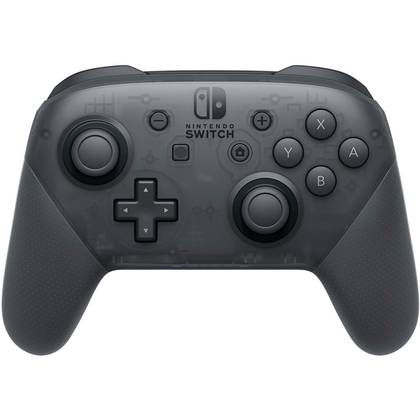
Nintendo Switch Pro Wireless Controller
$60 $70 Save $10Display card main info widget end- Brand
- Nintendo
- Platform
- Nintendo Switch, PC
- Battery
- 40 Hours
- Connectivity
- Wireless (BT), USB-C
- Headset Support
- Requires add-on
While the price tag may be higher than some other options, the Nintendo Switch Pro Wireless Controller is the best overall controller for the Nintendo Switch. It's perfectly sized, has a massive 40-hour battery life, and has seamless connectivity. It features motion controls, HD rumble, built-in Amiibo functionality, and much more.
Checkbox: control the expandable behavior of the extra infoPros & Cons- Budget Friendly
- Exceptional Battery Life
- Remappable Button
- Only Compatible with PC and Switch
- No Customization Options
The pro controller and joy-cons share fairly similar specifications at first glance, especially when regarding connection speed and input lag. Luckily for most gamers, they do not have to make major sacrifices in performance when choosing one controller over the other. It should be noted, however, that the pro controller boasts some differences in build that favors competitive play. The increased size of the pro controller leads to some improvements in the triggers and joysticks, meaning they both have a wider range of motion and increased sensitivity over the alternative.
Nintendo’s Joy-Con is an iconic controller, featuring dual-toned left and right controllers that offer a versatile way to play alone or with friends. Joy-Cons have excellent motion controls that many players can use for other devices in addition to the Nintendo Switch. Although motion controllers are few and far between, most players tend to agree that joy-cons are some of the most versatile options and have an exceptionally strong connection. That being said, stick drift is a major issue with joy-cons, though tech-savvy players may be able to swap out joysticks rather than replace the entire device.
It should also be noted that there are tons of third-party pro controllers that offer even more advanced specs than Nintendo’s version. Some of them even offer custom designs, RGB lighting, or top of the line Hall effect sensors.
Battery Life & Charging

One area where joy-cons and pro controllers majorly differ is the battery life and charging time. Joy-cons can be charged fully in less than 4 hours, and may last up to 20 hours of playtime. The pro controller, on the other hand, needs more time to charge, about 6 hours, but lasts up to 40 hours before needing another charge. Although the battery life on both controllers is certainly impressive, the pro controller is no doubt the victor in this category. In exchange for an extra two hours of charging time, the pro controller easily offers nearly double the amount of battery life compared to the joy-cons.
In addition to an improved battery life, the pro controller is undoubtedly easier to charge; using any USB type-C cable to charge. This can be done by plugging the USB directly into the Nintendo Switch, or by using a wall adapter. Meanwhile, joy-cons use a more specific charging solution, relying on the Nintendo Switch itself to charge. Unless you invest in a third party charging dock, you will be limited to charging one set of joy-cons at a time. Luckily, this shouldn't pose as too much of an issue unless you have many people frequently using multiple pairs of joy-cons.
Comfort

Nintendo uses high-quality materials for both controller options, but they are certainly not created equal.
First and foremost, many players feel like giants when using joy-cons because of their size. Most adult gamers struggle to use the single joy-con mode altogether during multiplayer games due to its size and shape. However, their small size also makes them ideal for motion games, because their lightweight nature makes it easy to use the joy-cons as an extension of the arms, rather than just a controller, and the locking wrist strap makes them safe to swing around. When playing with both joy-cons and Nintendo's Comfort Grip, things are a lot more comfortable. The comfort grip offers contoured sides, which makes a huge difference to the ergonomics of the “controller”. Although there aren’t any textured sides to this grip, it is supremely light, much more so than most pro controllers.
On the other hand, the Pro controller has a much more recognizable and ergonomic design. The shape is that of most standard controllers and thus, provides players with a comfortable and familiar grip, textured sides, and wider joysticks, making the Pro controller more suitable for larger hands. Although many Pro controllers do feature motion controls, they’re built less for movement and more for serious, focused gameplay. When the Pro controller initially hit the market, Smash players were clamoring to get their hands on one to best their opponents in the fighting game.
Aside from Nintendo's selection, there are many different options to choose from between third-party pro controllers and skins, most of which have dynamic textures and grips around the handles for extra ergonomic support.
Although joy-cons are fun and can be pretty comfortable, pro controllers are almost always going to be more ergonomic and comfortable through hours of gameplay.

The Best Controllers for Nintendo Switch
The Nintendo Switch allows gamers to use a variety of controllers, each with its own unique appeal. These are the best options for Switch owners!
Price

Budgets can vary between gamers, as they do with controllers. Some controllers are easier to find at a discount than others.
The fact of the matter is, joy-cons are some of the most expensive controllers on the market. They’re more expensive than the core Xbox controller, the PS5 DualSense controller, and more expensive than most Pro controllers. While it may seem normal for the name-brand version of a controller to be a bit costly, joy-cons also suffer from a terrible third-party market. It’s extremely difficult to tell the difference between a good third-party set of joy-cons and a box of rocks in the shape of joy-cons. Players mostly need to rely on sites like Amazon, where their purchase can be had with guaranteed return acceptance or a warranty of some kind, separate from the seller. There are some decent third-party joy-cons to be had in the $35-50 range, but at the end of the day, joy-cons will almost always be a somewhat opulent purchase.
At the same time, given their more standard shape and capabilities, Pro controllers can be had for as little as $15 or as much as $150. This includes a wider range of colors, designs, and functionality compared to the selection of joy-cons. Anyone can get a Pro controller they’re going to like, regardless of their available budget. For most gamers, the time to get a joy-con is when the old ones conk out, and the time to get a Pro controller is whenever a player feels like it.
Style

While there are some fun color options for joy-cons, this is one category where the Pro controller clearly wins out over them.
Nintendo has released a ton of different types of pro controllers with themes from various franchises, like Mario, Kirby, and Pokémon. It’s so easy to find a pro controller that shows off a player’s favorite fandoms, plus there are even more third-party controllers and skins available for swapping out styles on the fly at an even more affordable cost.
Joy-cons also have plenty of skins to choose from online, but as far as officially released Nintendo joy-cons go, there haven’t been too many options. Sure, there are some fun solid colors: like pastels, orange and purple, or neon pink and green, but there simply have not been as many varieties of joy-cons released as pro controllers. Additionally, it’s nearly impossible to find an RGB set of joy-cons, but pro controller users have a good handful to choose from.
Overall Usefulness

This category is one of the best to consider when choosing between joy-cons or a pro controller. At the end of the day, there are certain types of games that will be better enjoyed with joy-cons and some that will call for a pro controller.
Players would likely find joy-cons more useful if they often play:
- Motion and exercise games
- With other people, especially kids
- In handheld mode
- For short amounts of time
Players would probably find a pro controller more useful if they often play:
- Single-player games
- For multiple hours at a time
- While the Switch is docked
- Precision shooting, fighting or racing games
Choosing a Controller For The Nintendo Switch
Joy-Cons and the Pro controller are both solid accessories for the Nintendo Switch, perfect for use in a multitude of situations.
Overall, joy-cons are great for players with smaller hand sizes to play fun, quick games, and for using the Switch in handheld mode. Joy-cons are also great for players who enjoy party games, as the controller can be divided among two people easily and still retain all functionality. Joy-cons are also great for gamers who enjoy movement-focused games, as they can just be strapped to a player's wrist. All in all, Joy-Cons are the best choice for gamers who are looking for a casual and versatile controller.

Nintendo Switch Joy-Con
- Number of Colors
- 7
- Wireless?
- Yes
- Compatible Systems
- Nintendo Switch
- Brand
- Nintendo
- Battery
- 20hr
The Joy-Con is a versatile controller included with the Nintendo Switch. These controllers are great for playing in handheld mode, separately, or whenever an additional controller is needed to play party games. Joy-Cons should be the first choice for Nintendo Switch controllers for casual gamers.
Checkbox: control the expandable behavior of the extra infoAlternatively, the Pro controller is perfect for lengthy single-player gaming sessions, where a player's comfort is a core ideal in the experience. Additionally, the pro controller has a much longer battery life, needing less time in between charges than the average joy-con. The pro controller is also great for precision gaming and is used often by fans of fighting, shooting, and racing games.

Nintendo Switch Pro Wireless Controller
- Brand
- Nintendo
- Platform
- Nintendo Switch, PC
- Battery
- 40 Hours
- Connectivity
- Wireless (BT), USB-C
- Headset Support
- Requires add-on
The Pro Controller is a comfortable and ergonomic controller, designed for long hours of precision gaming. With a longer battery life, and a multitude of colors and designs to choose from, The Pro Controller should be the first choice for dedicated game enthusiasts and getting an edge up on the competition.
Checkbox: control the expandable behavior of the extra infoNo matter which option players choose, they’ll be playing with one of Nintendo’s most responsive and durable controllers ever.
Then again, why not just get both?

The Best Switch Games Under $10
The Nintendo Switch has a massive library of games, but if you're on a budget, there are actually a lot of titles to play for under $10.
FAQ
Q: Does the pro controller work on PC?
Yes, the pro controller can connect wirelessly with PC!
Q: How many pro controllers can connect to one Switch?
You can pair up to eight total controllers with your Nintendo Switch console simultaneously, including any joy-cons.
Q: How long do joy-cons take to charge?
Joy-cons can take up to three and a half hours to fully charge.
Q: Why are joy-cons so expensive?
Joy-cons are some of the highest-performing motion controls on the market today. With the IR motion sensor paired with Nintendo's other top quality electronics, joy-cons pack a lot of punch even though they're pricey.