


Summary
- Update 20.1.0 helps transfer data from the original Switch to Switch 2, enhancing the user experience.
- Two transfer methods are available: One requires proximity and internet connection while the other factory resets original Switch after moving the data.
- Nintendo Switch 2, set for release in 2025, will have improved hardware and exclusive games.
As the release date for the Nintendo Switch 2 comes closer, Nintendo is rolling out an update to the original Switch to help move software to the new model. This is the second recent update to the eight-year-old console that is all about upgrading its interface to help it play nice with the new Switch 2.
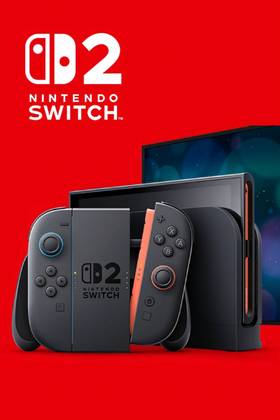
Set to release on June 5, 2025, the Nintendo Switch 2 will feature a number of improvements over the old Switch, including improved Joy-Con, more powerful hardware, new apps, and exclusive games like The Duskbloods. In order to make the upgrade from the old Switch to the new as seamless as possible, Nintendo is giving owners an update that could not have come at a better time to help facilitate the move.

Retailer Issues Warning Against Switch 2 Scalper Listings
A popular retailer warns customers to avoid scalper listings for the Nintendo Switch 2 before the highly anticipated console's launch on June 5.
Update 20.1.0 for the original Switch will rollout the ability to quickly and easily transfer data like compatible games and apps from the Switch 1 to the Switch 2, according to Nintendo. All hardware will now be equipped with this feature, including the Nintendo Switch, Nintendo Switch Lite, and Nintendo Switch OLED Model. The article also states that "some data can be transferred to Nintendo Switch 2, but not all."
System transfers will work in two different ways. The first will factory reset the Switch 1, but will allow consumers to transfer the system details to a Switch 2. This way, consumers who are selling their original Switch to purchase a Nintendo Switch 2 can smoothly transition to the new console. All the stored system data is kept on Nintendo's end until either a Switch 2 downloads it, is restored to the original Switch, or the download deadline of one year has passed. A Nintendo account is necessary for this process to work, but an active Nintendo Switch Online is not mentioned as a requirement.
|
Transferable? |
|
|---|---|
|
Digital software |
Yes |
|
All users |
Yes |
|
Save data |
Yes |
|
Screenshots, videos |
Yes |
|
System settings |
Yes |
|
News data |
No |
|
Bluetooth audio settings |
No |
|
Time, time zone, region, language |
No |
The second entails a local migration directly between the Switch 1 and Switch 2. This transfer method is recommended if the Switch 1 is still available when consumers get their Nintendo Switch 2 console. The consoles will need to be in proximity to one another and connected to the internet in order to complete this transfer, as the system will need to connect to an account as well as download games from the eShop.
Nintendo Switch Update 20.1.0 Patch Notes
- Visual updates have been made to the Parental Control settings.
- The sound that plays when Nintendo Switch Online is launched from the HOME Menu has been changed.
- General system stability improvements to enhance the user's experience.
Note: If performing a system transfer from Nintendo Switch to Nintendo Switch 2 using local communication, the Nintendo Switch console will need to be updated to this latest system version to perform the transfer. See System Transfer from Nintendo Switch to Nintendo Switch 2 for more information.
- Brand
- Nintendo
- Operating System
- Proprietary
- Storage
- 256GB internal / MicroSD
- Resolution
- 1080p (handheld) / 4K (docked)
- App Store
- Nintendo eShop
- Wi-Fi
- Yes