


The Schedule 1 map is fairly small when compared to a lot of other modern video games, but navigating it can still be a little confusing. The lack of a mini-map doesn't help in this regard, nor does the fact that players are unable to see the full Schedule 1 map on their in-game smartphone without scrolling the screen around.

How to Get All Effects in Schedule 1 (Mixing Guide)
This Schedule 1 mixing guide will explain how to get all 34 effects in the game and where to get all of the required ingredients.
The following guide contains a complete map of Hyland Point, which should make it much easier for players to get from A to B. Key locations like properties and businesses have been marked with different colors to make it easier for players to find them. A little further down the page, they'll find another Schedule 1 map with only these key locations included.
Complete Schedule 1 Map

On the Schedule 1 map shown above, the names of properties that the player can buy are written in green, while purchasable businesses are written in red. All other building names are written in white.
All Properties and Businesses in Schedule 1
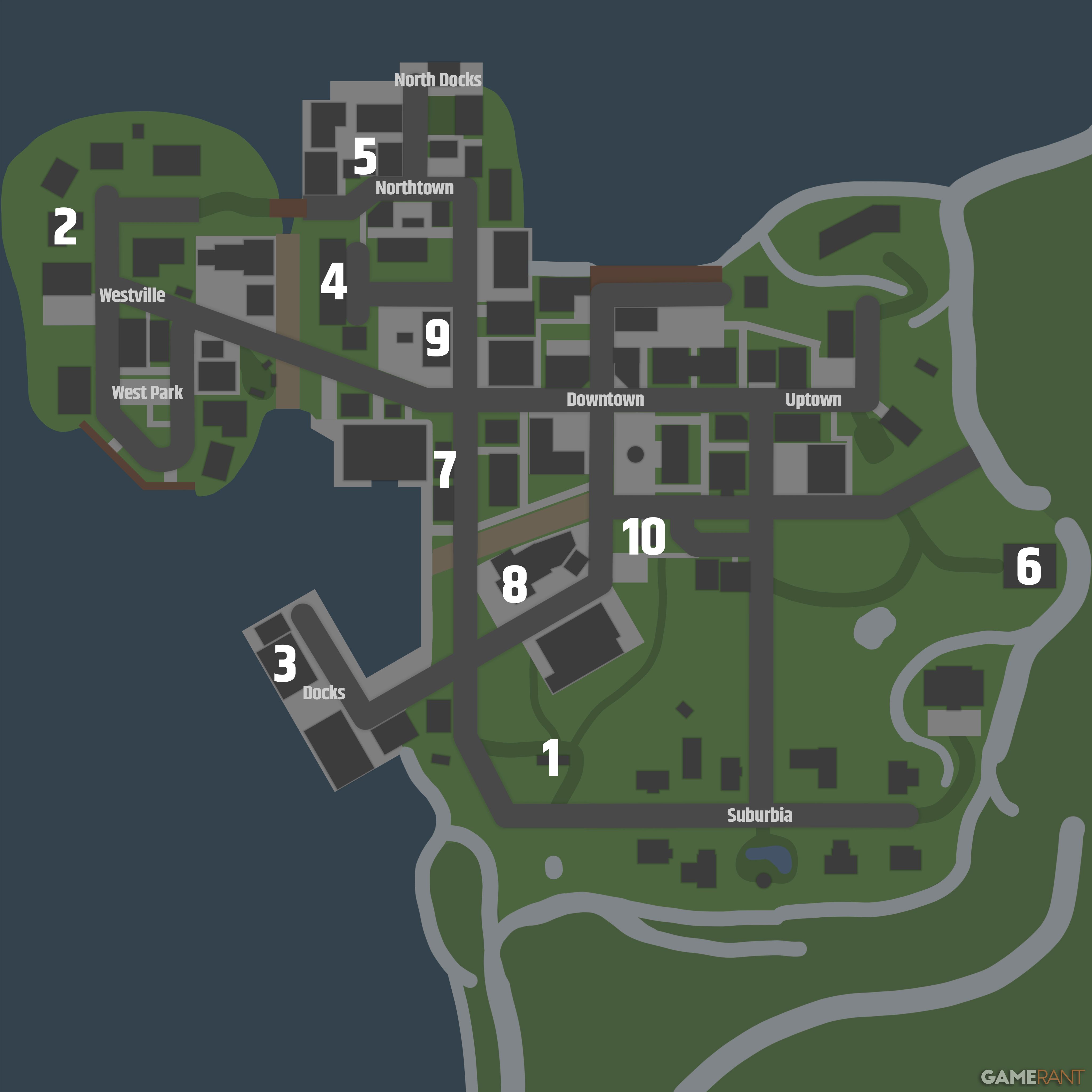
- RV
- Bungalow
- Docks Warehouse
- Motel
- Sweat Shop
- Barn
- Laundromat
- Car Wash
- Taco Ticklers
- Post Office
Players can use Schedule 1 console commands to instantly travel to one of the game's purchasable properties and businesses, even if they don't own it yet. To do so, they'll simply need to type "teleport " followed by the name of the place they want to fast travel to without any spaces, so "teleport dockswarehouse" or "teleport tacoticklers".


- Developer(s)
- TVGS
- Publisher(s)
- TVGS
- Engine
- Unity
- Multiplayer
- Online Co-Op
- Number of Players
- Single-player








WHERE TO PLAY


- Genre(s)
- Simulation, Crime, Action, Management, Strategy
