


Summary
- Activate Game Mode for faster reaction time and an edge over opponents in fast-paced games like Fortnite.
- Game Mode optimizes TV performance for better motion handling in action-packed games like Detroit: Become Human.
- Brands like Sony, Samsung, and LG offer TVs with Game Mode for enhanced gaming experience at different price points.
Playing games on any of the best TVs has advantages, including a wide screen for more immersion, enhanced audio quality, and the luxury of sitting a few feet away from the screen. If you play games that rely on quick reactions, you should know that the slightest delay can be costly. Although TVs have always been seen as less powerful than monitors for gaming, that's starting to change thanks to innovative features like Game Mode.

What Is HDMI 2.1 and Why Is It Important for Gaming Monitors and TVs?
HDMI 2.1 is the newest standard of the HDMI port. Here is why you need it if you have a PS5 or Xbox Series X.
When activated, Game Mode can increase a TV’s level of responsiveness, allowing you to stay ahead of the competition. It also improves the TV's ability to handle demanding games, which contributes to a thrilling experience for you and your friends. The feature gives you a significant edge over opponents even when using wireless controllers known for having higher latency than wired controllers.
How Does Game Mode Work for TVs?

Game Mode is a nice feature that manufacturers include in their TV models to make their products feel more responsive when being used for gaming. It comprises a couple of settings that, when activated, optimizes the TV’s performance, making games like Elden Ring and Rocket League run better on a larger display. What's more, some TVs come with Auto Game Mode, which is instantly activated upon detecting a gaming console. Even if yours has to be set up manually, it's not a difficult task and should be completed within seconds. Below are some of the advantages of having Game Mode activated during a playthrough.
Lower Input Lag
Input lag is a major concern for gamers, as the higher it gets, the more difficult it will be for players to enjoy their gameplay. It refers to the amount of time it takes your TV to render a signal from when the source transmits it. The source could be a console like the PS5 or a wireless gamepad like the Xbox Elite Controller. If you mainly play reaction-based games such as Fortnite and Apex Legends, you know that you need to be a few steps ahead of rivals if you want to be victorious. That means having a faster reaction time than opponents.
Fortunately, Game Mode can give you that and make you a menace to rivals by reducing the time your TV displays a signal gotten from the console or controller. Essentially, your button presses on the controller are instantly registered on the screen, allowing your in-game character to outwit rivals even in fast-paced moments. Ordinarily, competitive players gravitate to 1080p monitors because they are the perfect size for reaction-based games. However, if you fancy a larger display that's pretty affordable, then getting a TV equipped with Game Mode is a terrific idea.
Improved Motion Handling
Normally, you'd expect the TV's refresh rate to determine how fast it can capture fast-paced moments so you can view them. TVs with 120Hz refresh rates typically have excellent motion handling that eliminates display issues such as ghosting and blurring. Game Mode also plays a significant role here, as it strives to give you a better experience when playing video games with tons of action-packed sequences, like Detroit: Become Human. With ghosting and the likes no longer a problem, you can focus on the action without worrying about occasional dips in display quality.
How Can You Turn On Game Mode on TV?

As the name suggests, Game Mode is the preferable option when you are ready for an extended gaming session. Modern TVs have different modes aside from Game Mode, like Sports Mode and Cinematic Mode, which improve your experience with live sports games and movies, respectively. As such, identifying Game Mode is pretty simple. It should be noted that the activation process varies among TV brands.

Best TVs for Retro Gaming in 2024
Explore the golden age of gaming with TVs that bring retro games to life like never before.
For LG TVs running on WebOS 6.0, start by switching from HDMI Deep Color to On. The next step is pressing the settings button on the remote and navigating to Game Optimizer. Turn on this feature, and you should notice a significant difference in picture quality, input lag, and motion handling. Interestingly, Samsung TVs are designed to automatically recognize and activate Game Mode the moment a console is connected. The console could be PlayStation, Xbox, or Nintendo's Switch. If, for some reason, Game Mode refuses to be activated instantly, you can manually set it. Press the home button on your remote and navigate to All Settings. Move to Connection and then Game Mode settings. It is in this location that you can view your settings and adjust them as desired.
What TVs Support Game Mode?
Not all TVs come with Game Mode, though you should find it in different brands such as Sony, Samsung, and LG. You can even find it among budget TV brands like TCL and Hisense. While Game Mode can be manually activated, some brands like Samsung and Sony have made it possible for their TVs to instantly activate the feature once a console has been plugged in.
To help narrow the search and provide a wholesome list of options, we have curated the best gaming TV guide, which comprises some of the top-tier TV displays that can easily handle your gaming demands. If you still want to explore your options, then it's worth checking out online stores like Amazon and Best Buy to find TVs with Game Mode. Ensure that you have confirmed that a TV has Game Mode before going ahead and making the purchase.
The Best War Games's Best TVs for Gaming
-
Image
 Display card main info widget
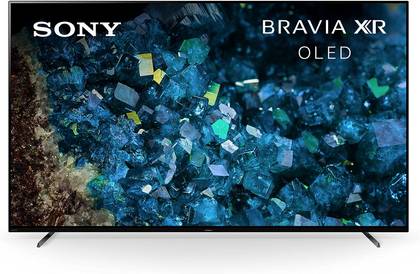
Sony BRAVIA XR A80L
Display card main info widget end- Dimensions
- 13"D x 48.38"W x 29.13"H
- Display Technology
- OLED
- What's Included
- Power Cable, Remote Control, AAA batteries, Stand
- Brand
- SONY
- Refresh Rate
- 120 Hz
- Resolution
- 4K
The Sony XR55A80L is a 55-inch OLED TV that boasts 4K resolution and a 120 Hz refresh rate, offering a suite of supported internet services including Prime Video, Hulu, Netflix, and more. This model includes features like a NEW Eco Dashboard, Acoustic Surface Audio+, and compatibility with Google/Alexa assistants, all within a 13"D x 48.38"W x 29.13"H frame.
Checkbox: control the expandable behavior of the extra info -
Image
 Display card main info widget
TCL QM8 QLED TV
$1000 $1200 Save $200Display card main info widget end- Dimensions
- 1.73"D x 56.93"W x 32.56"H
- Display Technology
- Mini-LED QLED
- Connectivity Technology
- Ethernet, Wi-Fi
- What's Included
- Remote Control, 2x Remote Control Batteries, Stand, Power Cable, Quick Start Guide
- Brand
- TCL
Checkbox: control the expandable behavior of the extra info
The TCL QM8 is a remarkable TV worth pairing with the Xbox Series X/S for premium gameplay. It features 4K visuals complemented with the high brightness levels (up to 2,000 nits) of a QLED display. Buyers will also enjoy better contrast and vivid colors for enhanced gaming thanks to the TV's QLED technology and HDR Ultra. With Game Accelerator 240, this TV can get a refresh rate of up to 240 Hz which translates to smooth motion handling for gaming and streaming too.
-
Image
 Display card main info widget
Hisense 55-Inch Class U8 Series Mini-LED ULED 4K UHD Google Smart TV
Display card main info widget end- Dimensions
- 3"D x 48.5"W x 28.2"H
- Display Technology
- Mini-LED
- Connectivity Technology
- Bluetooth, Ethernet, HDMI, USB, Wi-Fi
- What's Included
- Stand, TV, Remote Control, Power Cable
- Brand
- Hisense
- Refresh Rate
- 144 Hz
This 55-inch TV from Hisense uses proprietary ULED technologies to boost color, contrast, brightness, and motion. By utilizing LEDs that are significantly smaller than traditional LEDs, Hisense can create a bright image that distributes the light more evenly for a uniform image across the screen. Advanced gaming tech, like HDMI 2.1, VRR, and FreeSync Premium Pro, ensure that players have no issues with reacting quickly to in-game situations.
Checkbox: control the expandable behavior of the extra info
-
Image
 Display card main info widget
Samsung S90C OLED 4K
$1500 $1998 Save $498Display card main info widget end- Dimensions
- 10.5"D x 56.9"W x 35.3"H
- Display Technology
- QD-OLED
- Connectivity Technology
- Bluetooth, Ethernet, HDMI, USB, Wi-Fi
- What's Included
- User Manual, E-Manual, Power Cable, Remote Control
- Brand
- Samsung
The Samsung S90c packs some exciting gaming features for a smart TV. It supports streaming on platforms like Netflix, Apple TV+, and Xbox. It packs Samsung's OLED technology along with 4K resolution and a native refresh rate of 120 Hz. Among its strong points are the Neural Quantum Processor with 4K upscaling, Quantum HDR OLED, and Real Depth Enhancer. It features the Samsung Gaming Hub where gamers can play console games and check out game streaming apps.
Checkbox: control the expandable behavior of the extra info -
Image
 Display card main info widget
VIZIO 50-inch MQX-Series 4K 120Hz QLED HDR10+ Smart TV with Dolby Vision
$550 $630 Save $80Display card main info widget end- Dimensions
- 10"D x 43.8"W x 25.5"H
- Display Technology
- QLED
- Connectivity Technology
- Wi-Fi, Bluetooth, HDMI, USB, Ethernet
- What's Included
- XRT260 Voice Remote, 2 x AAA Batteries, Power Cable, Stand
- Brand
- Vizio
Checkbox: control the expandable behavior of the extra info
This Vizio MQX Series 4K television comes with a 50-inch display panel with QLED technology. The Quantum Color technology allows increased color performance in a 4K resolution with the use of Active Full Array Backlight technology and local dimming. Buyers will also appreciate the fact that this TV supports Dolby Vision HDR and HDR10+ for vibrant high dynamic range content. Vizio's smart TV platform allows easy access to millions of titles from popular streaming channels and other apps. Vizio WatchFree+ offers over 250 free live-streaming channels too.


The Best Budget Gaming TVs in 2024
Looking to buy a budget gaming TV that packs great value? The Best War Games spotlights some of the best options available in 2024.
FAQ
Q: Should I turn Game Mode on or off on TV?
As the name suggests, you should only activate Game Mode when you want to play games. Your TV should have other modes like Sports and Cinematic which are ideal for live sports and streaming movies.
Q: Why is Game Mode used?
Game Mode enhances your TV's performance, making it possible to react quicker than opponents in fast-paced games.
Q: Does a gaming TV make the difference?
Absolutely. Compared to regular TVs, gaming TVs are feature-rich and offer a sublime performance when paired with a console.